RO Payments can turn a payment into a subscription: the customer pays once, and the payment provider charges the next payments automatically. This works with Mollie and Stripe.
For a walk through the screens in Joomla itself, click Take a Tour in the top bar of the administrator and start the RO Payments Customers or RO Payments Subscriptions tour.
Set up a subscription profile
Subscriptions are set per profile: every payment with a subscription profile starts a subscription. Make a separate profile for subscriptions when you also take one-off payments.
- Open the Mollie or Stripe profile, or create one
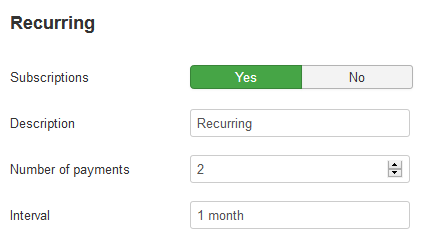
- On the Settings tab, under Recurring, set Subscriptions to Yes
- Fill in the subscription settings:
- Description - shown to the customer with each payment.
{ORDERNR}and{ORDERID}are replaced with the order number and ID of the first payment. - Number of payments - how many payments follow the first one. In this example the customer pays two more times after the first payment. Leave it empty for a subscription that runs until it is cancelled.
- Interval - the time between payments, for example
1 month,14 daysor1 year, in days, weeks, months or years. The longest interval is 1 year.
- Description - shown to the customer with each payment.
- Click Save
For Stripe, the webhook needs the subscription events, see Configure payment provider Stripe.
How a subscription starts
- The customer pays with the subscription profile, for example for a membership
- The customer pays the first payment at the payment provider
- RO Payments creates the customer at the payment provider, with the email address and, when the extension passes it, the name
- RO Payments creates the subscription at the payment provider, starting on the day of the first payment
- The customer sees the result of the payment
The payments of a subscription
The payment provider reports each payment of a subscription to the site. RO Payments records each payment as a transaction with the result the payment provider reports. A direct debit that is still being collected stays open until the result comes in; a failed payment is recorded as failed. After each payment, the next payment date of the subscription is updated.
Run the ropayments:next-payment-date console command
once a day to keep the next payment dates up to date.
RO Payments does not create orders in the extension for the payments that follow. Developers can
act on them with the onCreateRenewal and onRenewalResult events, see
A list of RO Payment plugin triggers.
Customers
Components -> RO Payments -> Customers lists the customers of the subscription profiles. Customers are kept per profile: a customer who pays with two profiles is a customer in each of them, also when both profiles use the same Mollie or Stripe account. Filter the list on a profile to see its customers.
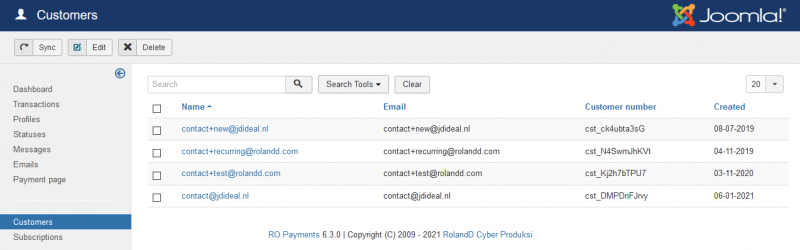
Open a customer to see the mandates or payment methods and the subscriptions of the customer.
Changes made at the payment provider are not sent to the site. Click Sync to get the customers of all subscription profiles from the payment provider.
Delete removes the customer from the site and from the payment provider. This cannot be undone.
Subscriptions
Components -> RO Payments -> Subscriptions lists the subscriptions, with their profile, amount, interval and next payment date.
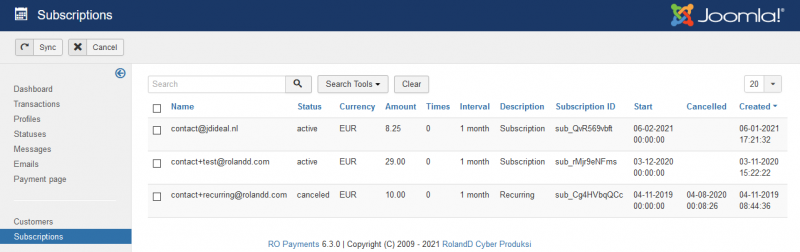
- Sync gets the subscriptions of all subscription profiles from the payment provider.
- Open a subscription to change it. The form shows only the fields the payment provider lets you change, for example the amount, the description or the number of payments.
- Batch changes the amount, description, interval or number of payments of the selected subscriptions at once.
- Actions -> Cancel cancels the selected subscriptions at the payment provider. The customer has to start a new subscription to pay again.
The subscriptions of the customer on the site
Create a menu item of the type RO Payments -> Subscriptions to show customers their own subscriptions. A logged-in customer sees the subscriptions of their email address, with the amount, interval and next payment date, and can cancel a subscription.