A chain can be run from the administrator, as described here, or from the command line and a cron job, see Running a chain from the command line or a cron job. Either way, a chain runs once at a time: while a run is in progress, the chain can't be started again.
Starting a run
Click Run next to the chain in Components -> RO CSVI -> Chains, or Run in the toolbar of the chain's edit page. RO CSVI first checks the chain, see Checks before a run. When the checks pass, the edit page opens with the run's progress at the top.
Following the progress
The progress panel shows:
- the run's status, such as Running;
- the step it is working on, for example Step 2 of 4 · Import, and that step's template;
- for an import, the number of lines it has processed so far;
- for a wait step, Waiting and the time the chain carries on with the next step;
- a bar with one part per step: a finished step is filled in, the current one is striped.
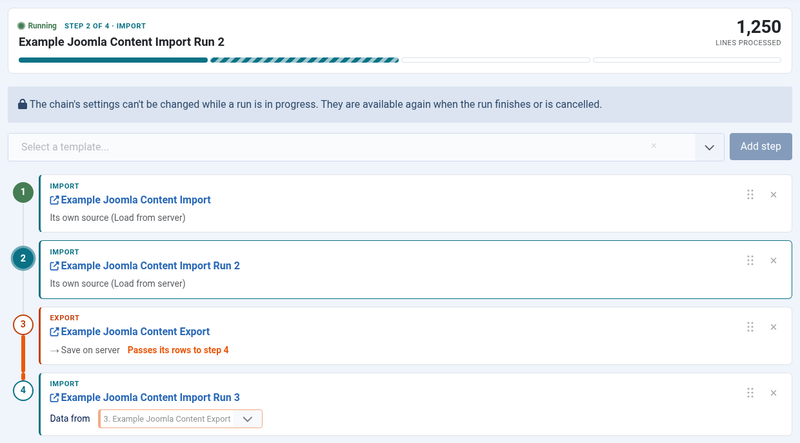
The current step is also highlighted in the list of steps. When the run finishes, a message lists every step with the number of lines it processed.
While the run is in progress:
- the steps can't be changed, added or removed;
- the chain details are hidden, and Save, Save & Close, Save as Copy and Run are not available, because the chain can't be changed while it runs. The chain's name stays in the page title. Everything comes back as soon as the run finishes.
Keep the page open
A run started in the administrator is carried out by the page that shows its progress: the page asks the server for one batch after the other. Keep the page open until the run has finished. It can be in a background tab.
When you leave the page while the run is in progress, the run is paused:
- Close in the toolbar first asks Leave while the chain is running?;
- reloading or closing the tab makes the browser ask whether you want to leave the page.
A paused run doesn't lose anything. It stops after the batch it was working on and waits until you resume it.
The status in the chains list
While a chain has a run in progress, the Run column of the chains list shows how it is doing, instead of the Run button:
| Shown | Meaning | Buttons |
|---|---|---|
| Running since ... with Processing a batch right now | A batch is being processed at this moment. | Cancel run |
| Running since ... with Last activity: ... | The run is in progress and was worked on moments ago. | Cancel run |
| Running since ... with Waiting until ... | The run is at a wait step and carries on with the next step at that time. | Cancel run |
| Started ... with Paused since ... | The page that ran it was left. | Resume, Cancel run |
| Started ... with Stalled, no activity since ... | Nothing has worked on the run for a while, without it being paused, for example because a browser crashed or a command line process was stopped. | Resume, Cancel run |
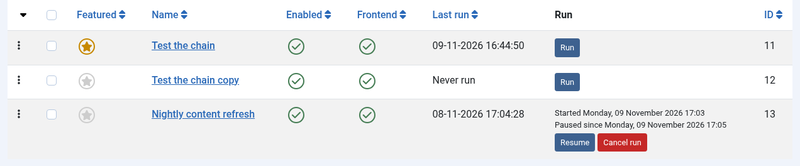
How long a run must be quiet before it counts as stalled is a setting, see When a run counts as stalled.
Opening the edit page of a chain whose run is in progress shows that run's progress without running anything itself. When the run is paused or stalled, the panel offers Resume.
When a run counts as stalled
Click Options in the toolbar of the chains list and open the Chains tab. Stalled After (seconds) sets how many seconds a run in progress may go without any activity before it is shown as stalled and can be resumed. It is 30 seconds unless changed, and at least 10.
Whatever runs a chain, a browser page or the command line, checks in every few seconds. That also holds while one batch takes much longer, because a batch that is being processed counts as activity. So a run that has been quiet for longer than this has nothing running it.
Raise the value when runs are shown as stalled while they are still in progress, for example on a busy server. A lower value shows a stopped run sooner, so it can be resumed sooner.
A run that was paused, because its page was left, is shown as paused straight away. This setting doesn't apply to it.
Resuming a run
Click Resume in the chains list or in the progress panel. The edit page opens and carries on from where the run stopped: at the same step and, for an import, at the same line of its file. The progress panel starts with the number of lines the step had already processed.
Cancelling a run
Click Cancel run in the chains list and confirm. A cancelled run can't be resumed. When the run is still working, it stops after its current batch. For an export step, which runs in one go, that means after the export has finished. The next step is never started.
A cancelled run keeps the logs of the steps it ran. Its temporary tables, which pass rows from an export to an import, are removed.
Run history
Every run of a chain is kept in its run history. Open it with Run History in the toolbar of the edit page, or select one chain in the chains list and choose Actions -> Run History.
For every run, newest first, it shows:
- when it started and how long it took;
- its status: Finished, Failed with the error, Cancelled, Paused, Running or Stalled;
- every step it got to, with the number of records. Wait steps aren't listed, because they process no records. The template's name links to that step's log details.
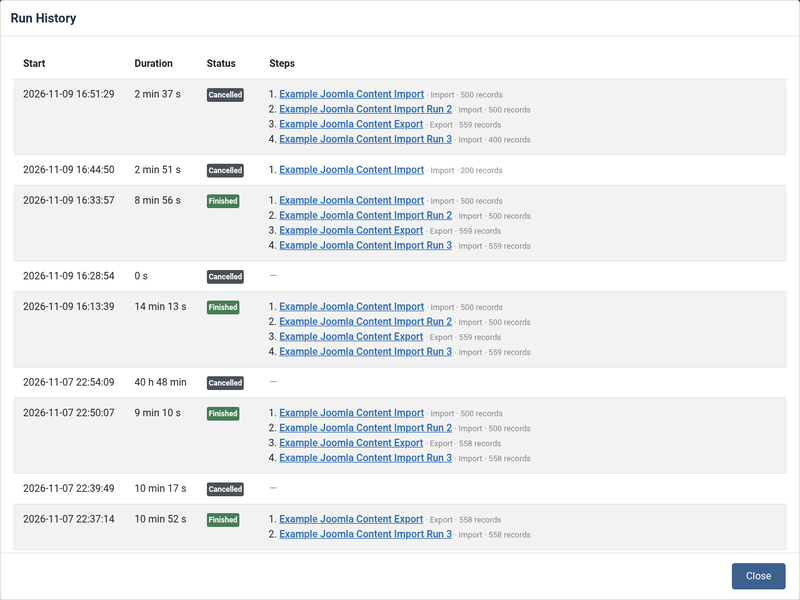
Each step also appears in Components -> RO CSVI -> Logs, the same as when its template is run on its own.
Temporary tables
Rows passed from an export to a later import go through a temporary database table, named #__csvi_chain_<run>_<step>. It is removed as soon as the import has read it, and when a run fails or is cancelled. Only a run that stopped in an unexpected way, such as a server crash, can leave one behind.
To remove those, run the maintenance operation Clean chain tables: go to Components -> RO CSVI -> Maintenance, choose RO CSVI and then Clean chain tables. It removes the temporary tables of every run that is no longer in progress. Unfinished runs other than the most recent one of their chain are cancelled first. The most recent run of each chain, and its tables, are kept, so it can still be resumed.
From the command line:
php cli/joomla.php rocsvi:maintenance --addon=csvi --operation=cleanchaintables