RO CSVI 9.3.0 release
Wow, we have come to the last release of 2025 and what a year has it been. A new major release has seen the light of day, Joomla 6 has been released, our monthly releases kept on rolling, and we moved on to newer PHP versions. We have added a lot of new features this past year and we continued support for new Joomla releases. The RO CSVI 9.3.0 release is all of the above. We are looking forward to another year of releases and support you with your endeavours.
Date filter
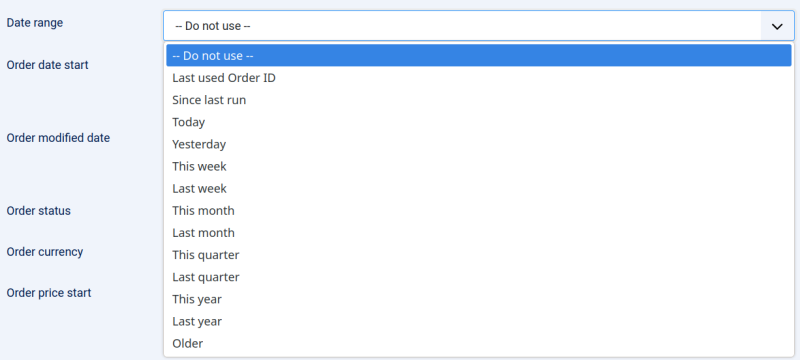
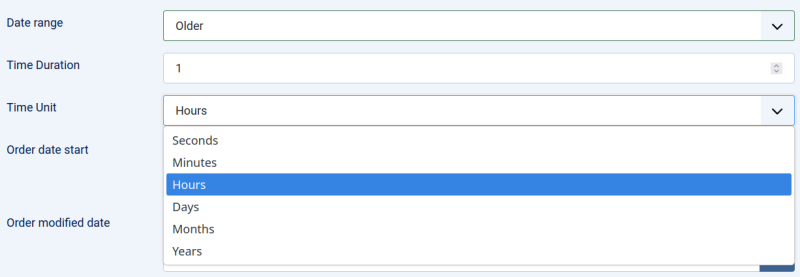
There are a number of exports where you can filter the export data on date. This code has been refactored and 2 new filters have been added:
- Today
- Older
Here you can specify a time duration and time unit e.g. 3 minutes or 5 hours or 1 month etc.
This gives you more control over the time-span an export should cover.
Quick Add
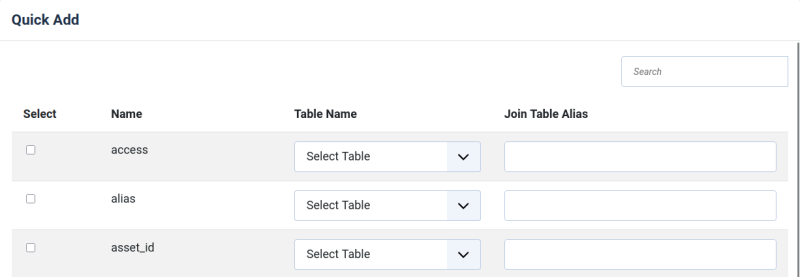
The Quick Add dialog has been extended with several options:
- Select the database field for a field when doing an Import from database
- Select the database table and enter the table alias when doing a Custom table export
- Select the worksheet when doing a Custom SQL export
Import Preview
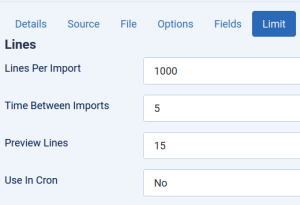
The import preview used to be 5 lines, then we changed it to 15 lines and now you can go to 1 million lines as we have made it a configuration option in the template. So you can decide how many lines you want to see in the preview for any given template.
J2Commerce
In this release we have added support for the J2Commerce app Add to user group. This allows you to import products and assign them to specific user groups.
Notable changes
- Template ID added to the template list
- Apply configured separators to custom fields used in
- Joomla Categories export
- Joomla Contacts export
- Joomla Content export
- Joomla Users export
- PhocaCart Product export
- For export templates we have renamed the Source tab to Destination tab
Changes in RO CSVI 9.3.0
Check the full list of changes in this release:
- Fixed XML imports with rules not processing due to values not being set correctly
- Fixed XML websites are not shown when export type is set to XML
- Fixed additional_images_alt doesn't have a default value in J2Commerce Product import
- Fixed conditional rule no longer working on some conditions
- Fixed Database field core_metadesc not having a default value in Joomla Content import
- Fixed debug log showing twice when viewing on screen
- Fixed editing a VirtueMart Google Merchant template is broken due to JS errors
- Fixed empty row added on J2Commerce Order Import with Keep Order ID set to Yes
- Fixed fulltext not having a default value in Joomla Content import
- Fixed database field metadesc not having a default value in Joomla Content import
- Fixed not all fields in the ucm_content table being added
- Fixed product ID filter not working in Google Merchant export
- Fixed publishing template fields not working
- Fixed the option Table Name and Table Alias are showing for template fields not using a custom table
- Fixed unpublishing template fields not working
- Fixed warnings on Custom Fields For All on VirtueMart Product import
- Added ID field to the template list
- Added a check if the vmPSPlugin is already loaded by another extension than RO CSVI and show an error message
- Added option to choose if order history lines should be added or updated in J2Commerce Order Import
- Added option to select Date Range of Today for selected export templates
- Added option to select Date Range of an Older date by specifying time duration and time unit for selected export templates
- Added option to select database field when adding fields via Quick Add for Import from database
- Added option to select database table and enter the table alias when adding fields via Quick Add for Custom table export
- Added option to select worksheet when adding fields via Quick Add for Custom SQL export
- Added option to set number of lines for preview per template
- Added support for Add to user group app of J2Commerce
- Added to apply separators as set in template also for custom fields in Joomla Categories export
- Added to apply separators as set in template also for custom fields in Joomla Contacts export
- Added to apply separators as set in template also for custom fields in Joomla Content export
- Added to apply separators as set in template also for custom fields in Joomla Users export
- Added to apply separators as set in template also for custom fields in PhocaCart Product export
- Changed the export of Stockable Custom Fields to match the format of the import format for Stockable Custom Fields
- Changed to rename Source tab to Destination tab for export templates
- Changed to unify processing of date filters
A full changelog of all changes is available on the download page of RO CSVI 9.3.0.
This release is available for free to everyone with an active subscription from the Download section. If you do not have a subscription yet, you can subscribe here.